Systems Analysis · UML · Workflow Modeling · Software Design

Workplace IT Help Desk System

A systems-analysis and software-design project modeling the workflows, user interactions, service operations, and application structure required for an internal workplace IT support system.

  • Systems Analysis
  • Use Cases
  • Sequence Diagrams
  • UML
  • Object-Oriented Design
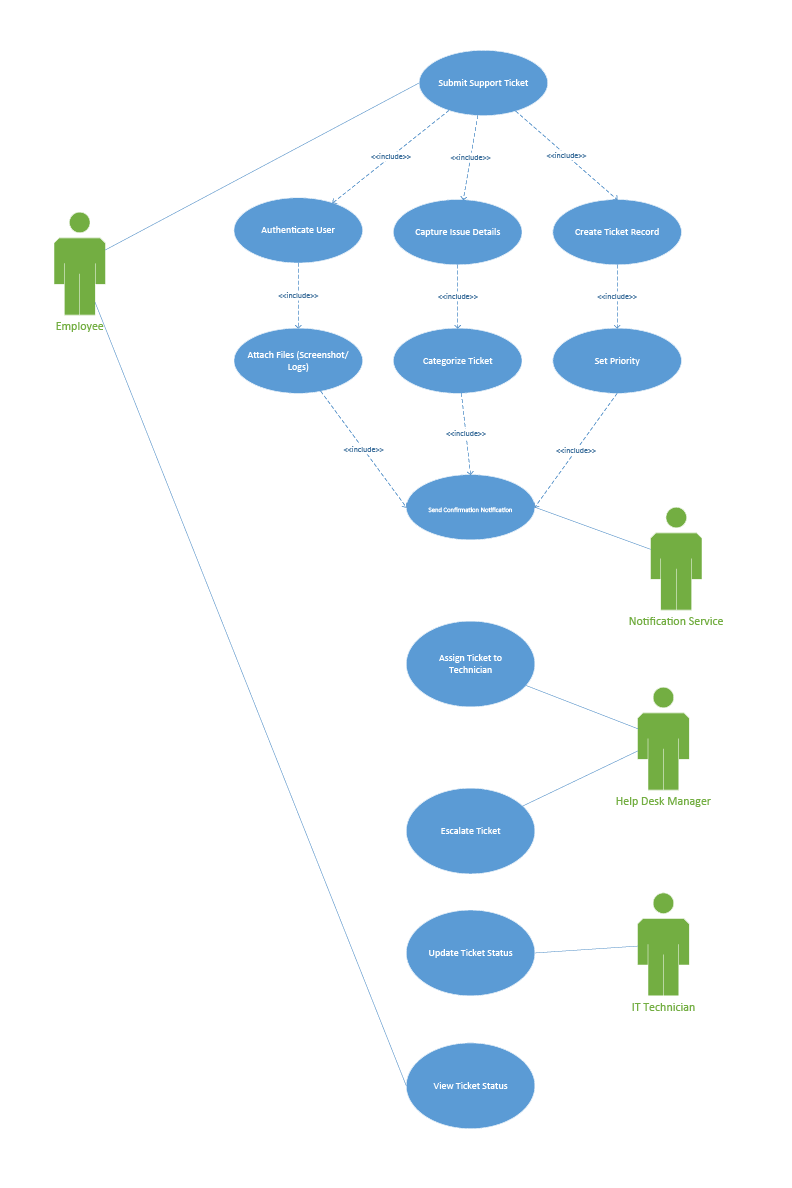
Overall use case diagram for the Workplace IT Help Desk System
Select the diagram to view the full-size system model.

Project overview

Modeling a structured IT support workflow

The Workplace IT Help Desk System was designed to model how employees, IT technicians, help desk managers, system administrators, and supporting services interact throughout the support-ticket lifecycle.

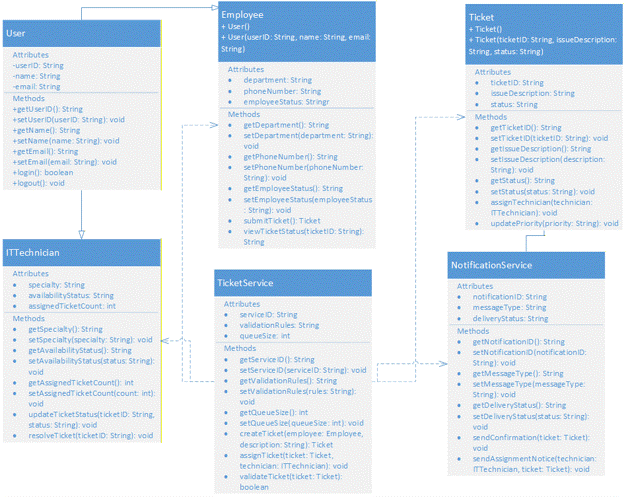
The project explores both the user-facing workflow and the underlying application structure. Use case diagrams identify system functionality, sequence diagrams model communication between software components, and a class diagram defines the core objects and services supporting the application.

Functional modeling

Mapping the major help desk workflows

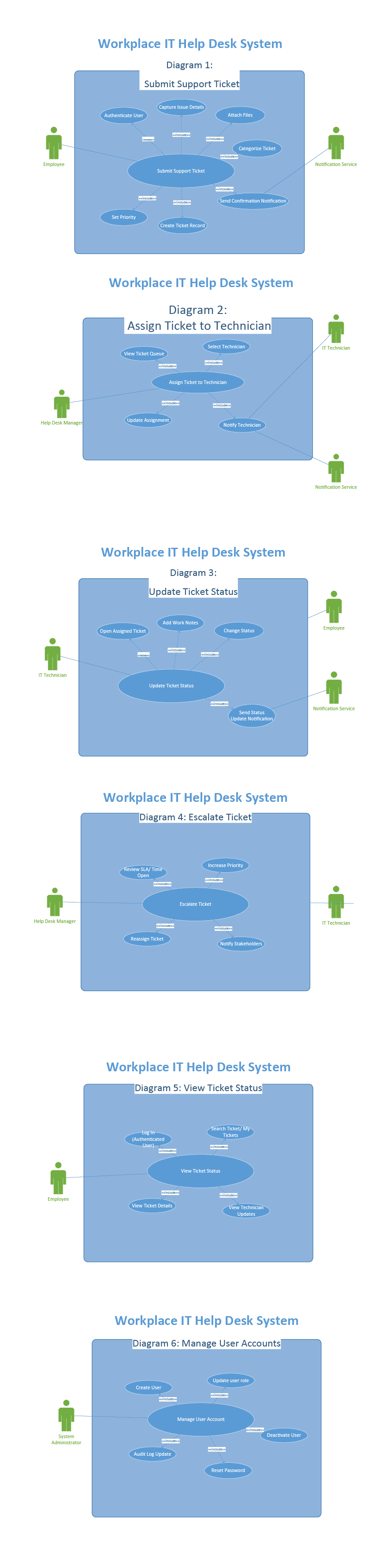
The system was divided into six primary workflows covering the ticket lifecycle and administrative responsibilities. Breaking the system into individual use cases made it easier to identify users, dependencies, decisions, and system actions.

01

Submit Support Ticket

Employees authenticate, enter issue information, attach supporting files, categorize the problem, and receive confirmation after a ticket record is created.

02

Assign Ticket to Technician

Help desk managers review the ticket queue, choose an appropriate technician, update the assignment, and notify the technician.

03

Update Ticket Status

IT technicians open assigned tickets, add work notes, update progress, and communicate status changes.

04

Escalate Ticket

Tickets requiring additional attention can be reprioritized, reassigned, and escalated when service expectations are not being met.

05

View Ticket Status

Employees can locate their submitted tickets, review ticket details, and see technician updates.

06

Manage User Accounts

System administrators can create accounts, modify user roles, deactivate users, reset passwords, and review account activity.
Six detailed Workplace IT Help Desk System workflow diagrams
Detailed functional workflows for the Workplace IT Help Desk System. Select the image to view it full size.

Use case model

Connecting actors with system functionality

The consolidated use case diagram provides a higher-level view of how the primary users interact with the system.

Employees interact with ticket submission and status tracking. Help desk managers oversee assignment and escalation activities, while IT technicians manage active support work.

Supporting services such as the notification service extend the workflow by providing confirmation and status communication.

Consolidated use case model showing employees, managers, technicians and notification services
Consolidated help desk use case model.

Interaction modeling

Following requests through the application

Sequence diagrams were used to show how users and application components communicate during important workflows. These diagrams helped connect the user experience with the underlying service and data layers.

01

Submit Support Ticket

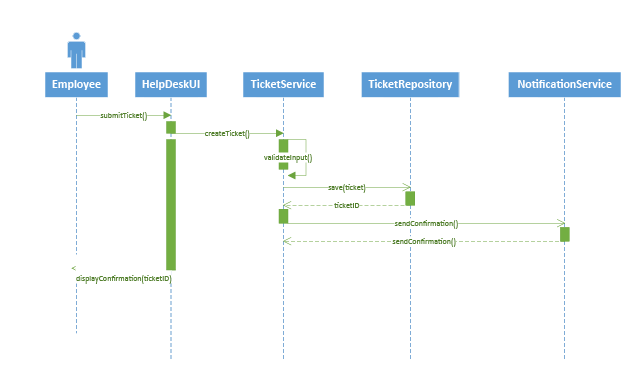
The employee submits a ticket through the Help Desk UI. The request passes to the TicketService, where the information is validated before the ticket is saved through the TicketRepository.

The NotificationService then sends confirmation and the interface displays the resulting ticket information to the employee.

Sequence diagram for submitting an IT support ticket
02

Assign Ticket to Technician

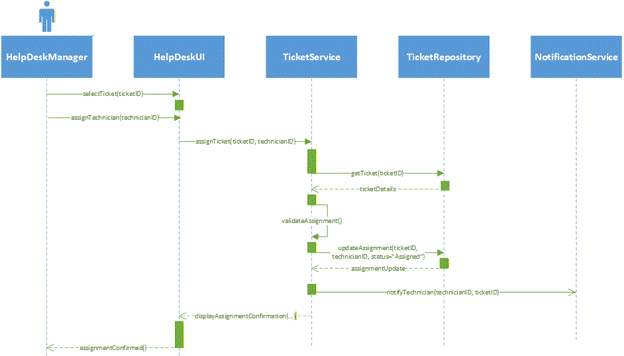
A help desk manager selects a ticket and technician through the interface. The TicketService retrieves ticket information, validates the assignment, updates the repository, and sends a notification to the selected technician.

The completed assignment is then confirmed through the user interface.

Sequence diagram for assigning an IT support ticket to a technician

Object-oriented design

Defining the system's core classes and services

The class diagram translates the workflow requirements into an object-oriented system structure.

Core classes represent users, employees, technicians, tickets, ticket services, and notifications. Attributes describe stored information while methods represent the actions each object is responsible for performing.

UML class diagram for the Workplace IT Help Desk System
UML class model showing users, employees, technicians, tickets, ticket services, and notification services.

System architecture

Separating interface, business logic, and data responsibilities

01

User interface

The HelpDeskUI provides the interaction layer where employees, technicians, and managers perform system tasks.

02

Service layer

TicketService manages validation, ticket creation, assignment, technician actions, and other business rules.

03

Data layer

TicketRepository manages ticket persistence and retrieval so system information can be stored independently from interface logic.

04

Supporting services

NotificationService handles confirmation, assignment alerts, and other communications generated by help desk workflows.

What this project demonstrates

Connecting business workflows with software design

This project demonstrates my ability to analyze a business process and translate operational requirements into structured system models.

Creating the use case, sequence, and class diagrams helped connect three perspectives: what users need to accomplish, how application components communicate, and how software objects should be structured to support those interactions.

  • Systems and workflow analysis
  • UML use case modeling
  • Sequence and interaction modeling
  • Object-oriented system design
  • Service and repository architecture
  • Technical documentation and communication

Software & IT

Explore more systems and technology projects.

Back to Software & IT